
How To Check Visa Status Online in Albania
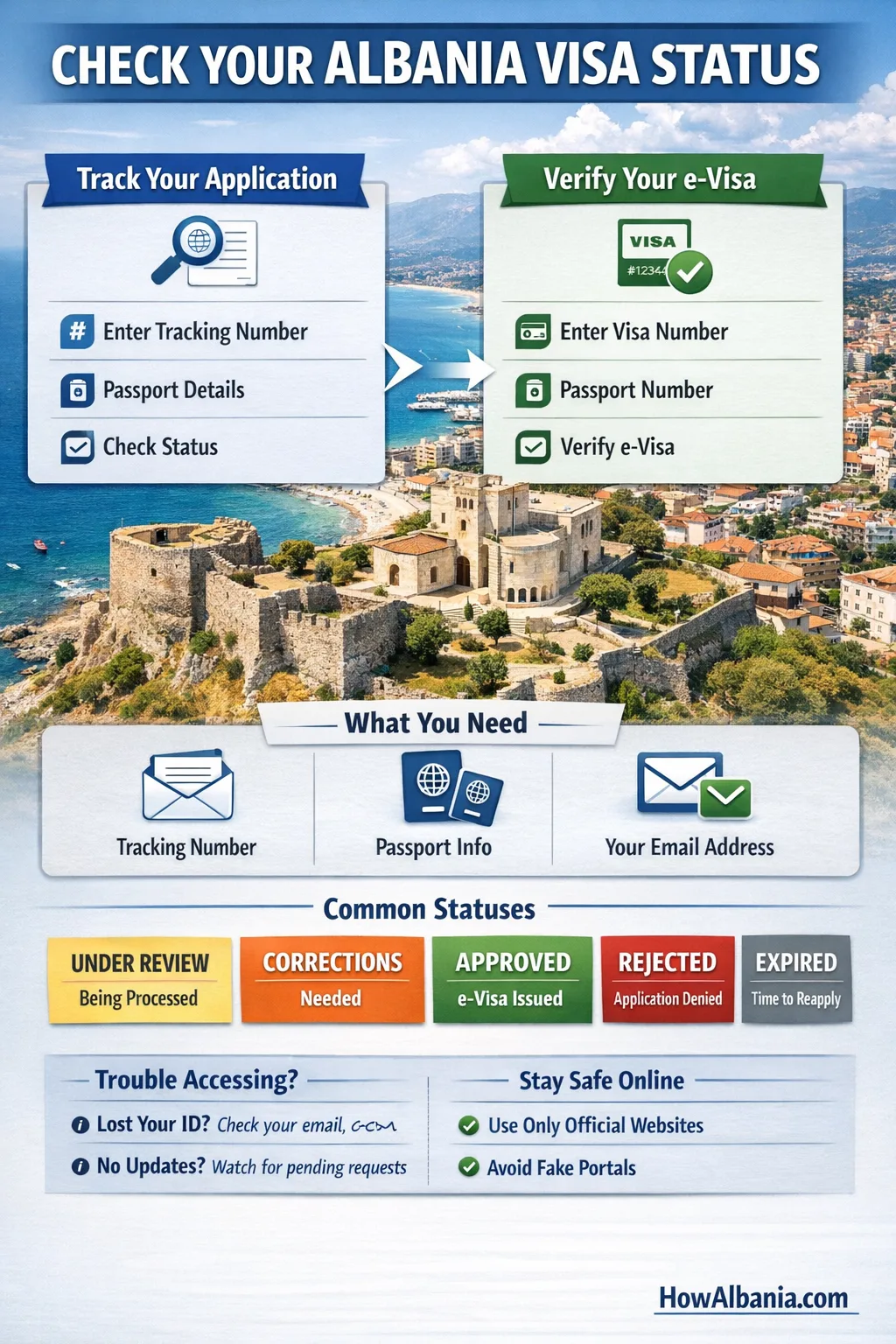
Short answer: You can track your Albania visa in two ways: (1) Track Application — to see your in-progress status, and (2) Verify Visa — to confirm an approved e-Visa. Both are done online and take under a minute if you have your reference and passport details ready.
What You Need Before You Check
- Tracking/Application number from your submission/confirmation email.
- Passport details (number; sometimes date of birth is requested).
- The email address you used when applying (keep it accessible).
Heads-up: The official domain you’ll use to track or verify is e-visa.al (and its official verification page). When in doubt, compare the URL with the links in the Official Links section below.
Method 1 — Track Your Application (Before Decision)
- Go to the official tracking page (Track application) and follow the prompts.
- Enter your application/track number (from your confirmation email) and any other requested details (e.g., passport number and/or date of birth).
- Submit to see your current status. You can save a screenshot or note the update time for your records.
Tip: If you created an account during application, you can also open Ongoing applications in the portal to view the same information.
Method 2 — Verify an Approved e-Visa (After Decision)
Once you receive an approval email, you can verify the e-Visa online to confirm authenticity:
- Open the official Verify visa page.
- Enter your Visa number and Passport number.
- Click Verify to confirm your e-Visa details and validity.
Why verify? Airlines, hotels, and border officers may ask you to present the approved e-Visa. Verification helps ensure the document is valid and matches your passport.
Method 3 — Residence/Unique Permit Applicants (e-Albania)
If you applied for a residence permit (including the Unique Permit / Digital Mobile Worker category), you can monitor progress via your e-Albania account:
- Sign in to e-Albania with your credentials.
- Go to My Services / Applications to view your application status and messages.
- Official communications (including e-documents with electronic seals) are delivered to your account and email; check spam/junk if needed.
Good to know: Residence-permit processing and documents are handled by the Ministry of Interior and the Border & Migration Directorates; many results/docs are issued digitally through e-Albania.
Common Status Messages (What They Mean)
- Submitted / Under Review: Your file is being assessed. No action unless the portal requests it.
- Returned for Corrections / Additional Documents: Re-open your application, correct fields, and upload what’s requested.
- Approved: Your e-Visa is issued. Download it from the email/portal and optionally verify it online.
- Rejected: Application declined. You may reapply after addressing the reason (if stated).
- Expired: Validity period lapsed; start a new application if you still plan to travel.
Troubleshooting & Tips (Lost ID, Delays, Emails)
- Lost your tracking number? Search your email (including spam/junk) for the submission/confirmation message from the portal. If you registered an account, check Ongoing applications.
- No updates? Processing can vary by season and case. Make sure there are no pending requests for extra documents in your portal inbox.
- Email delivery issues? Whitelist the portal address. Some approvals arrive as download links or e-documents; keep your inbox tidy and check from desktop if mobile formatting hides attachments.
Security Note: Avoid Fake Portals
Use only official links. The legitimate Albania e-Visa platform and its verification page are listed below. Third-party agencies may offer services, but your status and verification should be checked on the official system.
FAQ
Q1. Can I check my Albania visa status without a tracking/application number?
Usually no. Keep your reference from the submission email. If you registered an account, you can still view your application under Ongoing applications.
Q2. Can I verify my visa with just my passport?
To verify an approved visa, you typically need your Visa number and Passport number on the official verification page.
Q3. I applied for a residence/Unique Permit. Do I use the same site?
Residence/Unique Permit applications are managed through e-Albania, where you can see status messages and download e-documents with electronic seals when issued.
Q4. What if my status says “Returned for Corrections”?
Re-open the file, fix any fields marked in red, and upload the requested documents. Submit again promptly to avoid delays.
References
- Track Application (e-Visa): e-visa.al/track
- Verify Visa (Approved e-Visa): e-visa.services/verify-visa
- Visa Rules (Ministry for Europe & Foreign Affairs): punetejashtme.gov.al — Visa Regime
- Residence/Unique Permit Info (Ministry of Interior): mb.gov.al — Residence/Unique Permit
- e-Albania Notices (Electronic-seal documents): mb.gov.al (archive notice)